In the digital world, an image is not only worth more than a thousand words; it is often the one that closes the sale. Spectacular product photos, a visually striking portfolio, graphics explaining your services… they are the heart of your website. But here is the harsh reality: those same images that you work so hard to create are frequently the anchor that drags down your site’s performance.
If you have ever wondered why your website, despite its professional design, feels heavy or slow, the answer is probably in your image files. This guide is the manual you need. We will teach you the secrets of image optimization for the web so you can have the best of both worlds: a visually stunning and ultra-fast website.
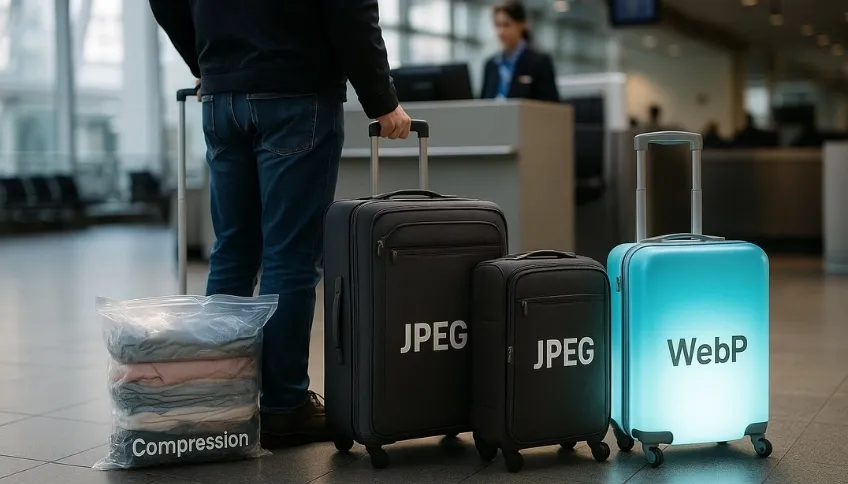
Think of your website’s images as luggage for a plane trip.
- A PNG file is a hard, heavy suitcase. It’s great for protecting fragile things (graphics with transparency), but it takes up a lot of space and weight.
- A JPEG file is a canvas duffel bag. It is lighter than the hard one, but if you overfill it, it’s still heavy.
- Compression is like using vacuum bags to suck the air out of clothes. You drastically reduce the size and weight of your luggage without leaving anything behind.
- And the WebP format… is like having a suitcase made of a futuristic, ultra-lightweight, and durable material that weighs a fraction of the others but has the same capacity.
Your goal is to travel as light as possible to reach your destination (the client’s screen) faster.
The Battle of Formats: Why WebP is the New King
Not all images are created equal. Choosing the right format is the first and most important step to improve speed with your images.
- JPEG/JPG: For years, the standard for photographs. It uses a type of compression that reduces file size at the cost of a small (often imperceptible) loss in quality. It’s good, but it’s no longer the best.
- PNG: The king of graphics with transparent backgrounds (like logos). Its main issue is that the files tend to be very heavy, especially for photographs. Using a PNG for a product photo is a common performance mistake.
- WebP (The Google Format that Changes Everything): This is the future, and it’s already here. WebP is a modern format created by Google that offers identical or superior image quality to JPEG, but with a file size that is 25% to 35% smaller. Plus, it also supports transparency like PNG! Today, all modern browsers are compatible with WebP, so there’s no excuse not to use it.
The Art of Compression: Less Weight, Same Visual Quality
Once the format is chosen, the next step is to make the image “slimmer.” Compressing images for the web means removing unnecessary data from the file without the human eye noticing the difference. You have two ways to do this:
- The Manual Way (For One-off Tasks): Free online tools like TinyPNG or Squoosh are fantastic. You simply upload your JPEG or PNG image and download a much lighter version.
- The Automatic Way (The Professional Strategy): For a website with many images (like an online store), doing it manually is impossible. This is where WordPress plugins come in. Tools like Imagify, Smush, or the image optimization feature of LiteSpeed Cache can do all the work for you:
- Automatically compress every image you upload.
- Convert your images to the WebP format and deliver them to browsers that support it.
- Resize images to the correct dimensions so you don’t load a 4000-pixel photo where only 800 pixels are needed.
The Secret of Smart Loading: “Lazy Loading”
Even with optimized images, why load all 50 photos on a page if the visitor is only seeing the first three? This is where “Lazy Loading” or deferred loading comes into play.
- What is it? It is a technique that tells the browser: “Only load the images that are currently visible on the user’s screen. For the others, load them as the user scrolls down.”
- What is the benefit? The initial loading time of the page is drastically reduced since it only has to load a fraction of the total images. This has a very positive impact on user experience and your images and Core Web Vitals metrics. The good news is that modern versions of WordPress already implement Lazy Loading natively.
Image optimization for the web is not an option; it is a fundamental pillar of any professional and successful website. It is the perfect balance between aesthetics and performance. Now that you know the three secrets—the correct format (WebP), smart compression, and lazy loading—you have the power to put your website “on a diet.”
You can start today. Take one of the main images from your homepage, run it through a tool like Squoosh, and compare the file weight of the original version with the optimized WebP version. You will be surprised at how much unnecessary “weight” your website is forcing your visitors to load.
This is a job that requires attention to detail and constant maintenance. If you prefer a team of digital “nutritionists and personal trainers” to ensure your website is always at its ideal weight, fast, and in top shape, check out our Web Performance Portal—we at Web Booster are here to chat. We take care of the technical diet so you can focus on feeding your business.
👉 Contact us on WhatsApp
Visits: 25