How many times a day does someone in your city search on Google for exactly what you offer?
Most of those searches don’t reach websites. They get resolved directly on Google Maps. And therein lies the problem: thousands of SMBs don’t appear because they never claimed their profile, or they have it filled with incomplete information that Google quietly penalizes.
Around 46% of all Google searches have local intent. Nearly half of the people are looking for something nearby—a service, a shop, an agency. If your business doesn’t have a presence there, for those searchers, you simply do not exist.
By the end of this article, you will have your Google Business Profile created, verified, and optimized to appear on Maps before your competition, without paying for ads.
What is Google Business Profile and Why Does It Matter for Your Business?
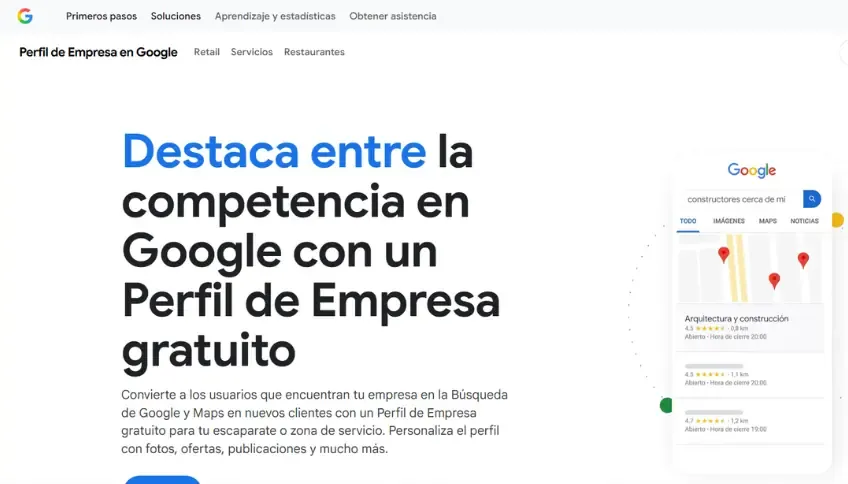
Google Business Profile is the profile that appears when someone searches for your business, or a service like yours, on Google Search or Google Maps. It displays your name, address, hours, photos, reviews, phone number, and a link to your website.
It is completely free.
Try this exercise: search for “web agency near me” on Google. The first three results you see are not standard websites. They are business profiles on Maps with real photos, reviews, and a direct call button. Businesses without a profile simply do not show up in that view, no matter how long they have been in business or how good their service is.
That is exactly what happens to your business when someone searches for what you do in your city.
According to Google’s data, businesses with complete profiles receive twice as many interactions as those with incomplete profiles. More calls, more clicks, more direct visits.
How to Create Your Google Business Profile Step-by-Step
What you need before starting: A Google account (Gmail) and your business’s commercial name.
- Go to business.google.com and sign in with your Google account.
- Click “Manage now” or “Add your business to Google”.
- Type your business name. If Google has already indexed it, it will show a suggestion—click “Claim this business”. If it doesn’t exist, select “Create a business with this name”.
- Choose your primary category. Be specific. Not just “Agency” but “Web development agency”. Not just “Store” but “Women’s clothing store”. This category determines which searches you appear in.
- Define your location. If you have a physical location where customers can visit, select “Yes” and add the exact address. If you work virtually or deliver, select “No” and define your service area.
- Add your phone number (ideally the one you use for WhatsApp Business) and your website URL.
- Click “Next” to start verification.
Profile Verification
Here is where most people get stuck.
Google needs to confirm that your business is real. The most common options are:
- Postcard: Google sends a physical postcard with a 5-digit code to your address. It takes between 5 and 14 days. This is the most common method.
- Video or video call: You show your location, entrance, or tools in real-time. This is currently the fastest method.
- Phone or email: Available only in some cases depending on the business type.
Important: Until the profile is verified, it will not appear publicly on Google or Maps. Do not skip this step.
How to Optimize Your Profile to Rank First on Google Maps
Creating the profile is only 20% of the work. The remaining 80% is optimization. Here is what makes the difference between ranking first or on page 3.
Complete 100% of the information. Google shows a progress bar on your dashboard. Every empty field is a silent penalty in your ranking. Fill it out completely.
Real photos, not stock images. Upload at least 5 photos: storefront, team, products, or services in action. Profiles with photos receive up to 35% more clicks according to Google. Stock photos don’t fool anyone—neither users nor the algorithm.
SEO-driven description. You have 750 characters. Don’t use them to say “we are the best”. Use this space to explain what you do, for whom, and in which city. Example: “Web development agency specializing in e-commerce websites for SMBs looking to sell online.” Natural, direct, with keywords your ideal client is searching for.
Always up-to-date hours. Incorrect hours on holidays is the fastest way to get a 1-star review. Update them before any special date.
List your services. Add each service with a name, brief description, and price if applicable. This shows up directly on your listing and reduces friction.
Secondary categories. You can add up to 9. If you are a web agency, add: graphic design, digital marketing, computer consulting. More categories mean more searches where you can appear.
Q&As. If no one has asked anything yet, write them yourself based on the common questions you receive on WhatsApp. This counts as fresh content for Google and reduces barriers before purchase.
Reviews: The Most Influential Factor in Local Ranking
Google uses three variables to decide who ranks first on Maps: review volume, quality (stars), and frequency (how recent they are).
A business with 50 reviews at 4.5 stars will almost always beat one with 5 perfect reviews. Consistency tells Google that your business is still active and that people trust it today, not three years ago.
How to ask for reviews without violating Google’s policies:
- Ask for them at the exact moment the customer is satisfied—right after closing a deal or delivering a project.
- Don’t just tell them “search for me on Google.” Go to your profile, copy the direct review link, and send it to them via WhatsApp. Make it easy for them.
- Never buy reviews or offer discounts in exchange for them. Google detects fraudulent patterns and can suspend your profile permanently.
- Respond to all reviews. Positive ones build relationships; well-handled negative ones show future customers that you are professional and resolve issues.
How to Connect Google Business Profile to Your Website
Your Google profile and your website should not work as separate pieces. When Google sees that the information on both matches, your authority rises.
Correct Link: Add the exact URL of your website (with https://) to the profile. It sounds obvious, but many businesses leave it blank or link to a broken page.
UTM Tracking: If you want to know exactly how much traffic comes from your listing, add UTM parameters to the URL:
https://yourwebsite.com/?utm_source=google&utm_medium=gbp&utm_campaign=profileThis lets you track clicks and leads in Google Analytics.
Google Search Console: Verify your site is registered. This confirms to Google that the profile and the domain belong to the same business, boosting your local search standing.
Call to Action Button: Configure your profile’s primary button based on how you close sales. If your first contact is via WhatsApp, use “Send message.” If you sell by phone, use “Call.”
Schema Markup: A well-built website with Local Business structured data tells Google exactly who you are, where you are, and what you do—directly boosting your Maps ranking. It’s not decoration; it’s infrastructure.
The 5 Most Common Errors SMBs Make on Google Business Profile
- Not claiming the profile. Google creates listings automatically using public data. If you don’t control it, the data could be wrong, and any user can suggest changes that Google might accept without your approval.
- Leaving the profile unverified. Many businesses create the account and never complete this step. Without verification, the profile doesn’t exist for Google or your customers.
- Out-of-date hours. Especially on local holidays. Nothing frustrates a customer more than showing up to a business that Google said was open.
- Zero or low-quality photos. A profile without real images looks abandoned. A modern smartphone with good natural light is enough to show a serious business.
- Ignoring negative reviews. Not responding is worse than receiving the bad review. A professional, empathetic response can turn a bad experience into a trust signal for future customers.
Google Business Profile is free, but doing it right—keeping it updated, responding to reviews, connecting it with your web, adding Schema markup—requires time and criteria that you don’t always have when your priority is operating your business.
At Web Booster, we handle the creation, verification, and optimization of your profile so you appear where it really matters: in front of the clients who are already searching for what you offer in your city today. Web portals